Streaming / RTMP Ingest
Streaming ingest is the process of sending video from a camera or encoder to a streaming server over a protocol such as RTMP so it can be delivered to viewers in real time.
What does ingest actually cover?
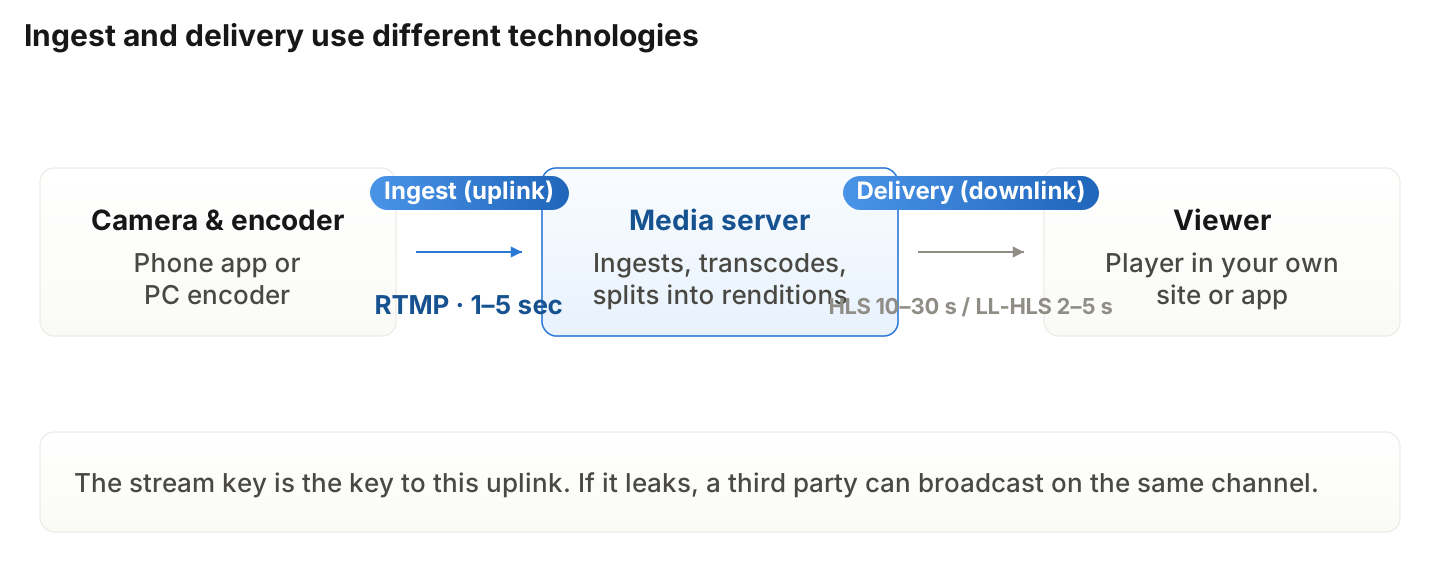
Usually the leg from the camera up to the server. Delivery down to viewers is a separate leg, often on a different protocol. Keeping the two apart is what lets you decide where to look when "the stream is broken" — on the way up or on the way down.
What do you need?
A video source, an encoder, and the server address and stream key the platform issues. A phone app includes the encoder, so you can start with no extra hardware; multiple cameras or subtitle overlays call for a desktop encoder. Treat the stream key as broadcast permission — keep it out of screen shares and captures.
Which settings decide quality and stability?
The balance of resolution, frame rate, and bitrate. Set bitrate above your real upload headroom and quality improves right up until the stream stalls. On an unreliable venue connection, dropping one resolution step and leaving bitrate headroom serves viewers better. Wired connections and a backup line are basics for a large broadcast.
What do you check when it drops or lags?
In order: the encoder's upload health (dropped frames), the venue connection, encoder settings, then the delivery leg and the viewer's own environment. Judging from the viewer screen alone inverts cause and effect, so keep encoder metrics and the viewer view open side by side during a show.
Choosing how to stream
Phone app | Desktop encoder | Studio setup | |
|---|---|---|---|
What you need | One smartphone | Camera, PC, encoder | Lighting, audio, multi-camera |
Best for | On-site, in-store, ad hoc | Subtitles, multiple sources | Large productions, campaigns |
Connection | Mobile or Wi-Fi | Wired recommended | Wired plus a backup line |
Crew | 1–2 | 2–3 | 3 or more |
Weakness | External audio and angles | Less mobile | Cost and setup time |
Shoplive's view
Ingest is the leg nobody mentions when it works and the one that voids every other preparation when it doesn't. The failures we meet on site are rarely equipment — they're the missing backup line and the missing plan. What to decide before the run-of-show is what happens if the stream drops; once that exists, ingest stops being a topic.
Frequently Asked Questions
Q. How is RTMP different from WebRTC?
RTMP is mostly the camera-to-server leg; WebRTC carries delivery to viewers at sub-second latency as well. They're different legs of the path, not substitutes.
Q. Can you broadcast from a phone alone?
Yes. A dedicated app puts the encoder and camera in one device, so you can start without hardware. Multiple angles, subtitle overlays, or external audio favor a desktop encoder.
Q. What happens if the stream key leaks?
A third party can broadcast on your channel. Reissue it immediately if you suspect exposure, and keep the setup screen off any shared view.
Q. How much upload speed do you need?
Typically 1.5–2× your target bitrate as headroom. Connections dip momentarily, so plan against the floor, not the average.
Q. Can you change settings mid-broadcast?
Most encoders require a reconnect, which means a visible interruption. Lock the final settings in rehearsal instead.
Related terms
Learn more


Last updated