Highlight Clip
A highlight clip is a short-form video cut from the strongest moments of a longer live broadcast so the content keeps working after the stream ends.
What does it actually cut?
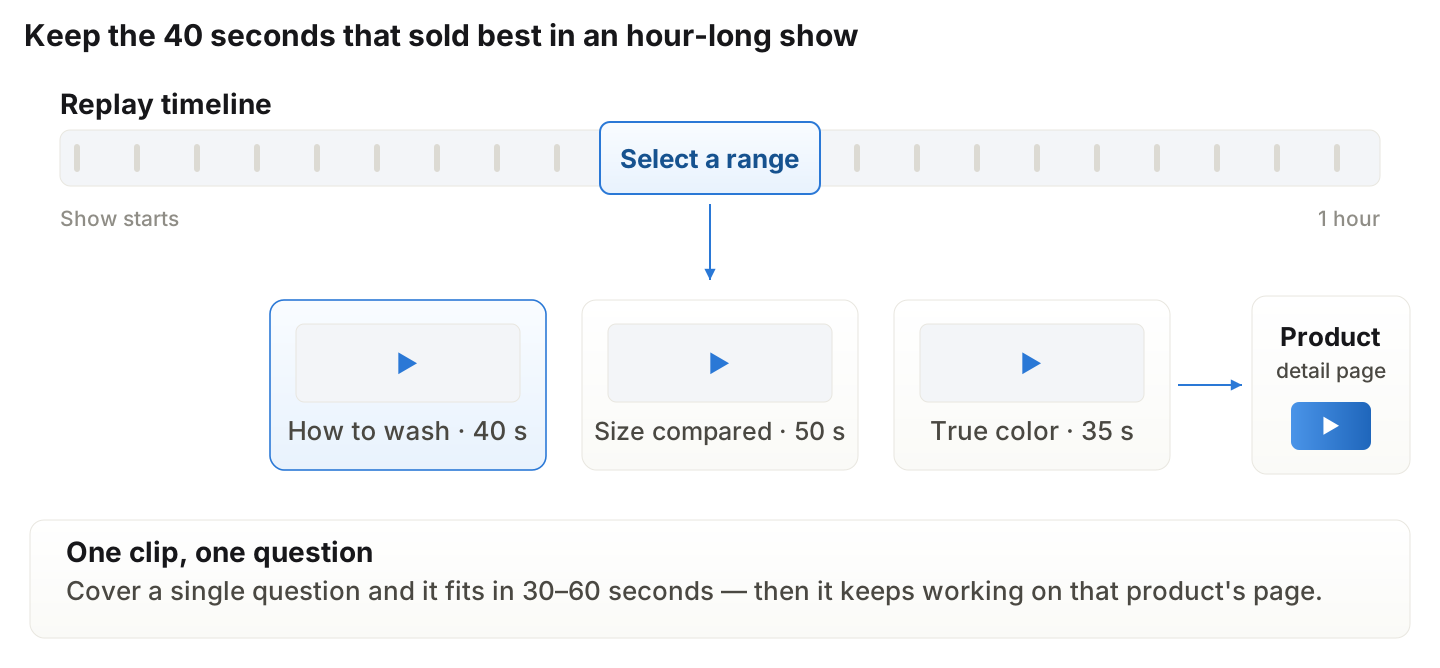
A 30-to-60-second stretch of an hour-long broadcast, published as its own video. Unlike a replay, which keeps everything, one clip answers one question. The forty seconds where the host explained how to wash the garment becomes an asset that keeps working on that product's page.
Which moments should you pick?
Data tells you, not instinct. The best candidates are where three things overlap: the concurrency curve rising, chat clustering, and product-card clicks spiking. Separating whether the reaction came from the explanation or from an offer also tells you what the clip is for.
How does it differ from a replay or short-form?
A replay is a record for people who missed the show; a highlight clip is a piece that resolves one specific doubt; short-form is exposure for discovery. The clip bridges the two — once made, it fits both a product page and a social feed.
Where does placement pay off most?
The product detail page for that item, where everyone already came for the product and the path to purchase is short. After that, discovery slots on home and category pages, then your social accounts. The more places one clip is reused, the more a single broadcast returns.
Replay vs. highlight clip vs. short-form
Replay (VOD) | Highlight clip | Short-form | |
|---|---|---|---|
Length | The whole broadcast | 30–60 seconds | 15–60 seconds |
Purpose | Cover a missed show | Resolve one specific doubt | Discovery and exposure |
Placement | Live tab, product page | Product detail page | Home, category, social |
Production cost | None (auto-archived) | Low (mark a range) | Medium if planned separately |
Shelf life | Per broadcast | Long, tied to the product | Depends on algorithmic reach |
Shoplive's view
The biggest waste in live is treating the end of the broadcast as the end of the content. The forty seconds that sold best in an hour aren't a broadcast moment — they're that product's explanation, and most brands never keep them. The teams that spend least on content production are the ones that schedule clipping into the run-of-show instead of leaving it as cleanup.
Frequently Asked Questions
Q. How long should a clip be?
One question fits in 30 to 60 seconds. For several topics, several short clips beat one long one.
Q. Can you cut during the broadcast?
On some platforms you can mark ranges live. Marking as you go cuts post-production time substantially.
Q. Do clips need subtitles?
Yes — most viewers watch with the sound off, and subtitles also open the clip to other languages.
Q. Do clips compete with the original broadcast in search?
Rarely, since their purposes differ. Copying the same title and description across both can look duplicative, so title the clip after the question that section answers.
Q. Can clips be used as ad creative?
Yes, and it lowers creative-testing cost because the reaction is already proven. Confirm talent and music usage rights in the contract first.
Related terms
Learn more

Last updated