Not Every Live Show Should Be Public

Words by
Roaane
Edited by
Lucid
💡 Key Takeaways
Brands that never saw live shopping as a fit for what they sell can still use it. Private Mode turns a live show into a channel for a specific, invited audience instead of the open internet.
Ten scenarios, across two very different jobs: selling products (VIP clienteling, pre-launch access, quiet clearance, trade buyer previews) and selling content and access (courses, member-only shows, concerts, coaching, gaming).
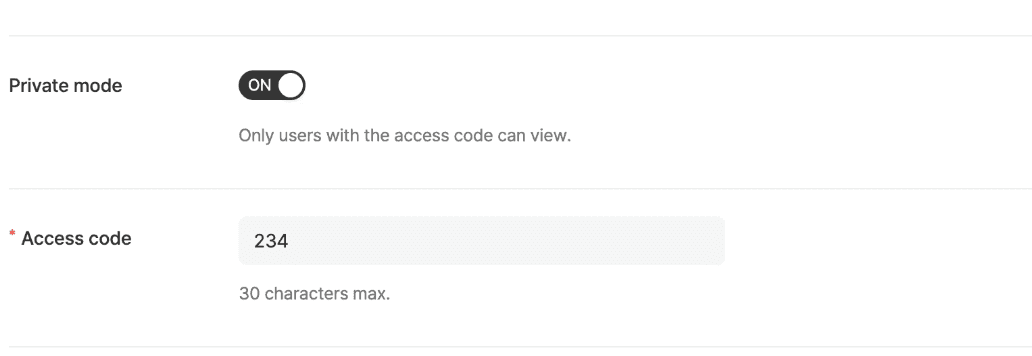
Switching it on takes one option when you create the show. Shoplive generates the passcode for you, so there's nothing to build.
Does a live show have to be open to everyone?
No. You can run a show that only guests with a passcode can enter. Turn on Private Mode and Shoplive locks the broadcast behind a code. Whoever has the code gets in. Everyone else doesn't see the show at all.
Live shopping is usually the opposite of that. Anyone can walk in, watch, chat and buy. Which is exactly why a lot of brands look at it once and decide it isn't for them.
"We don't sell to the general public. Why would we run a live show?"
It's a fair question, and the answer is that plenty of selling situations were never meant to be public in the first place. A clienteling appointment with a top spender. An early look at a product that hasn't launched. A collection preview for wholesale buyers. A show that exists as a perk for paying members. None of those get better by being open to everyone.
What Private Mode actually does
Private Mode is a live show with a passcode on the door.
If a normal live show is a shop floor open to the street, Private Mode is an appointment in the back room. When you create the broadcast in Shoplive, you pick Private Mode, a passcode is generated for that show, and only the people you send it to can get in.
PUBLIC LIVE
Anyone enters → anyone watches → anyone buys
PRIVATE MODE
Only invited guests enter → only chosen customers watch → you sell to the room you picked
That one setting changes what live shopping is for.
Selling products behind a passcode (uses 1 to 4)
1 Luxury VIP and private sales
Privacy is part of the product in luxury and in the auction world. Discretion isn't a nice touch, it's the reason the client is buying from you and not a marketplace.
In May 2026, Farfetch launched FARFETCH Live, a livestream open only to invited private clients, where a fashion concierge presents high-value watches and jewellery and takes questions one to one.
Private Mode does the same thing without the guest list being a logistics problem. Bring several VIP clients into one room, show the piece in real time, answer what they ask, and close in the same session.
If you're in luxury, fine jewellery and watches, or art and auctions, this is the private viewing you already run offline, moved online without losing what made it private. We went deeper on why the auction world is moving this way in Why eBay Is Doubling Down on Live Auctions.
Pre-launch and early access
With a new product, who sees it first is a decision, not an afterthought.
Invite your VIP list or your most engaged fans, show them the product before anyone else, and give them the first right to buy. You get real reactions before launch day, which means you're reading demand instead of guessing at it, and you can take pre-orders in the same show.
WORKS BEST FOR
Categories where the reveal itself carries weight: beauty, tech, fashion, sneakers.
Quiet clearance and warehouse sales
Sometimes you need to move stock at a discount without putting that discount in front of every customer you have. Send the passcode to your email list or your loyalty members, and run the sale behind it.
The stock clears. Your public pricing stays where it is. And the discount does a second job as a members-only perk, which is a reason to join the list and a reason to come back.
WORKS BEST FOR
Anyone carrying seasonal stock in fashion, beauty, kids, or home and living, and especially brands running live on their own site rather than someone else's platform.
Trade buyers and wholesale previews
Season pricing, minimums, delivery windows: none of that belongs on a public stream. But buyers still need to see the line.
Invite buyers only, walk the collection in real time, and take questions as you go. The advantage over a showroom is that you're not meeting one team at a time. Buyers in different cities and different time zones see the same presentation together, and the ones who couldn't make it watch the recording.
WORKS BEST FOR
Wholesale in fashion, jewellery and accessories, or home and living. This is a showroom appointment that scales.
Selling content and access (uses 5 to 10)
Private Mode isn't only for moving product.
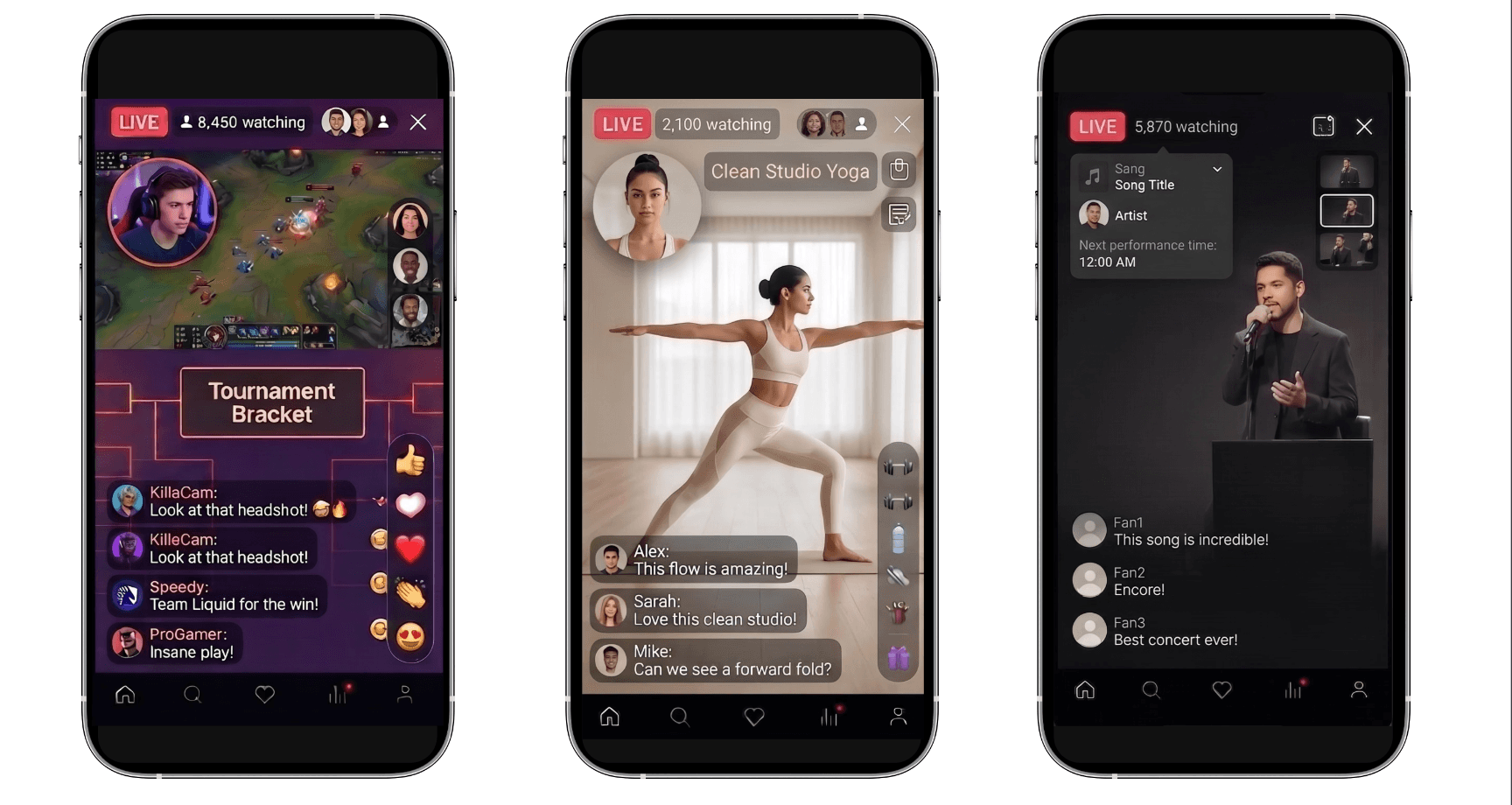
Any time you need to put something in front of a specific group, take their questions, and talk to them live, the same mechanism applies. The range is wide: training, regulated professional sessions, fan events, concerts, premium classes.
Training and professional seminars
Run online training or a professional seminar that only your invited audience can attend.
A hospital or medical device company can hold a session for clinicians only. A company can train employees and channel partners. In regulated fields this isn't a preference, it's a requirement: pharma and medical device communication in the US and Europe is often restricted to verified healthcare professionals, and a public stream simply isn't an option. With Private Mode only invited attendees get in, and the presenter takes questions through live chat.
WORKS BEST FOR
Medical and scientific seminars, corporate training, certification courses and expert webinars, anywhere the audience has to be a closed group.
Member-only content
Give VIPs or paying members something the rest of your audience doesn't get.
A creator can run a behind-the-scenes stream for channel members. A football or basketball club can put player interviews and training footage in front of season ticket holders and supporters' club members.
The point isn't just extra content. It's content that exists because someone is a member.
Fan events, concerts and online experiences
Run a private show alongside the public one. Give the private stream to VIP ticket holders, and use it for what the main event can't hold: backstage footage after the show, an artist interview, a Q&A with a room small enough to actually answer in.
One event, two tiers. The public version builds the audience and the private one is what the premium ticket is worth.
Premium classes and small-group coaching
When the value is depth rather than reach, a smaller room is the product.
Personal training, yoga and pilates, wellness programmes, professional consulting: formats where a participant asks something specific and the instructor answers them directly. That doesn't survive at open-webinar scale. In a private room it does.
Private talks, author events and readings
Authors, experts and speakers can host something for a particular set of readers or clients rather than for everyone.
An author with a book coming out can run a private reading for a core group of readers. An expert can put a talk behind paid membership. Nobody has to travel, and the conversation stays small enough to be a conversation.
Gaming and esports streams
Streamers and pro players can run a subscriber-only stream next to their public one.
Coaching sessions, ranked play, the stuff that doesn't work in front of a general audience. Live chat keeps it two-way, which is the whole reason someone subscribed.
The public stream is how you find fans. The private one is how you keep the ones that matter.
Why not just use Zoom or Google Meet?
You can absolutely hold a private broadcast on Zoom. The difference is what happens during the show, and what's left when it ends. Private Mode lets someone buy, subscribe or convert without leaving the stream, and it leaves behind a content asset with product, purchase and customer data attached to it.
Zoom / Google Meet | Shoplive Private Mode | |
|---|---|---|
Built for | Meetings and video calls | Customer-facing content and commerce |
How people join | They attend a meeting | They watch your brand's content |
What it looks like | A video conferencing UI | A video experience styled as your brand |
Selling | Needs a separate store and links |
|
Customer data | Meeting-centric |
|
CRM | Manual work |
|
Who owns the content | A recording |
|
What happens afterwards | Limited use once the call ends |
|
What "private" means | A locked meeting room |
|
So a Private Mode show doesn't end when you stop streaming. It becomes a replay and a set of short-form clips, and the first-party data (who watched, what they asked, which products they clicked) stays with you. We wrote about connecting that data to the customer journey in How Live Commerce CRM Differs From Ecommerce CRM.
FAQ
Q. What exactly does Private Mode do?
It puts a passcode on a broadcast, so only viewers who have the code can enter. Everything else works the same as a public show: chat, product cards, checkout.
Q. Who distributes the passcode?
You do. Pick Private Mode when you create the show in the admin and the passcode is generated automatically. Most brands send it the way they already reach the people they want in the room, usually email, a CRM campaign, or directly to a buyer.
Q. Do we need a separate system or any development work?
No. It's an option in the live admin you already use. Nothing to integrate, nothing to build.
Q. Which kinds of brands should be using this?
If you're selling products: auctions and luxury clienteling, pre-launch access, quiet clearance, trade buyer previews. If you're selling content or access: online courses, talks and readings, concerts, fan events, fitness coaching, gaming. The common thread isn't the industry. It's wanting a live show that only certain people can see.
Q. Is a new passcode generated for every show?
Yes. Each broadcast you set to Private Mode gets its own code, and you decide where it goes.
Q. Can we issue different passcodes for different membership tiers?
Yes. Create a separate show per tier, each with its own code, and send each code only to the tier it belongs to.
Q. How is this different from running a private call on Zoom?
Zoom and Meet are meeting tools. To sell anything you need a separate store and links, and when the call ends you have a recording. Private Mode surfaces products inside a branded video experience and takes the viewer through to purchase, then carries on working as VOD and short-form once the live has finished.
Q. Can we see customer data from a private show?
Yes. Watch time, chat and product interest are captured the same way as in a public show, and you can connect them to your CRM journeys.
SOURCES
FARFETCH Live: An Exclusive Livestream Experience for Private Clients · aboutfarfetch.com, 26 May 2026
Luxury too is giving in to livestream shopping · NSS Magazine
Christie's and Sotheby's private sales as a share of revenue · The Art Newspaper, 17 December 2025
Share of new clients in Christie's private sales · ARTnews, 23 April 2026
The 2026 Inventory Distortion Study · IHL Group


