Instagram Live Ads: 9 Steps to Reach New Buyers

Words by
Joy
Edited by
Lucid
💡Key takeaways
Launched in Korea on September 30, Instagram Live ads run a stream that's on air as an ad, so people who don't follow you can see it too.
In Meta's research, businesses using the ads had about 24x more live viewers than those that didn't. Send those new viewers to a live show on your own online store, and the purchases and customer data stay with your brand.
Setup takes 9 steps in Ads Manager. Schedule the ad before the show, and match the ad schedule exactly to your stream time.
If your brand runs live commerce shows on a regular schedule, you've probably hit this wall. The show is well prepared, but the people who tune in are the same followers as always. Loyal regulars are a good sign. To grow sales, though, you need people who've never seen your brand to join the stream.
On September 30, 2026, Meta officially launched Instagram Live ads in Korea. They take a live stream that's on air right now and run it as an ad, so it shows up in the Feed, Stories and Reels of people who don't follow you. This guide covers what the ads are, why they matter for brands that go live, how to pair them with Shoplive live shows on your own online store, and the 9-step Ads Manager setup with real screenshots.
What Are Instagram Live Ads?
They're a Meta ad product that uses an Instagram live stream in progress as the ad creative. The ad appears with a 'Watch live video' button, and one tap takes viewers straight into the stream.
Until now, Instagram Live notifications mostly went to followers. With live ads switched on, the stream also reaches people Meta thinks are likely to buy. The ads run in three places, and each one displays a little differently.

Source: Meta, "Instagram Live Video Ads" guidebook
Placement | How it displays |
|---|---|
Stories | Plays the live stream for up to 15 seconds |
Feed and Reels | Keeps playing until the user scrolls past |
Five features stand out for brands.
Wider reach: Your stream reaches people with high purchase intent who wouldn't have watched without the ad.
No extra creative: The live stream is the ad, so there's no need to make separate images or videos.
Links to product pages: You can add external links, such as your website, to the live screen.
Scheduling ahead: Schedule the ad before the show and it can get approved in advance.
Budget per show: You set a separate budget for each show. Spend more on a big launch and less on a small one, so there's no need to commit a large budget up front.
Pricing works the same as regular Meta ads, and there's no extra fee on sales or transactions during the live. For a big show, you can also run 'reminder ads' to collect sign-ups for a go-live notification ahead of time.
Why Is This a Big Deal for Brands That Go Live?
Because your audience is no longer limited to your followers. Live sales come down to how many people join the stream and what share of them buy (your conversion rate). Without ads, conversion rate was really the only lever you could pull. Live ads work on the other side of the equation: they directly grow the number of people who show up.
Meta shared its own research alongside the Korean launch.
Metric | Meta's findings |
|---|---|
Live viewers | About 24x (businesses that spent $100 or more vs. businesses not using the ads) |
Purchases | Up 17.1% (based on 25 measurement studies) |
ROAS (return on ad spend) | 2.7x (Meta data) |
Note the $100 benchmark. It's a small enough amount to test once or twice without a big budget. Before the official Korean launch, Dyson and Qoo10 Japan ran early tests. Keep in mind these are Meta's own numbers, and the research method hasn't been shared in detail. The most reliable way to see what the ads do for your brand is to try them on your first one or two shows.
How Did Early Adopters Do?
Meta's guidebook features two overseas brands that tried the ads early.
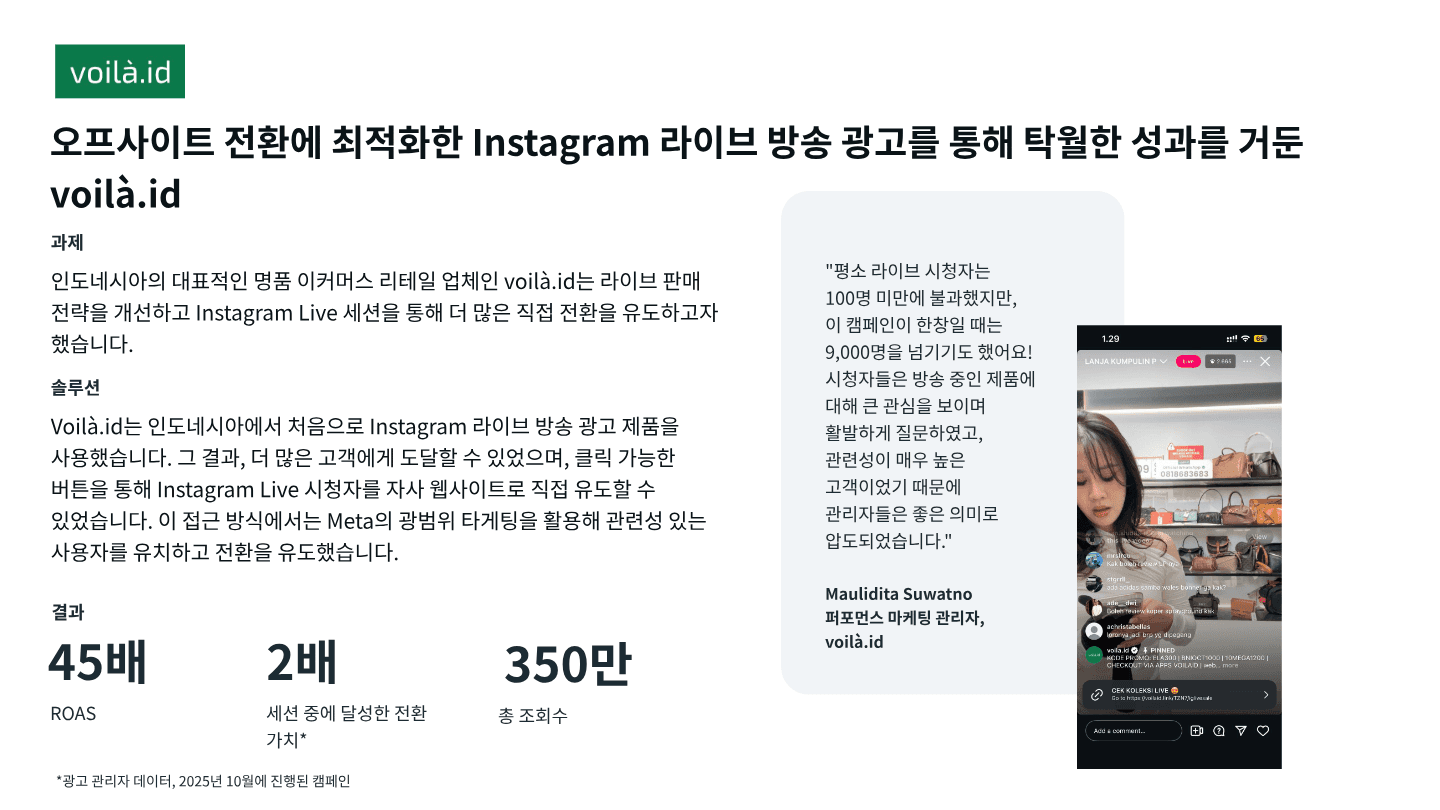
voilà.id is a luxury e-commerce company in Indonesia and the first in the country to use these ads. It targeted broadly to pull in viewers, then sent them straight to its own website through a button on the live screen. Live viewership, usually under 100, passed 9,000 at the height of the campaign. That's more than 90 times as many people in the stream.
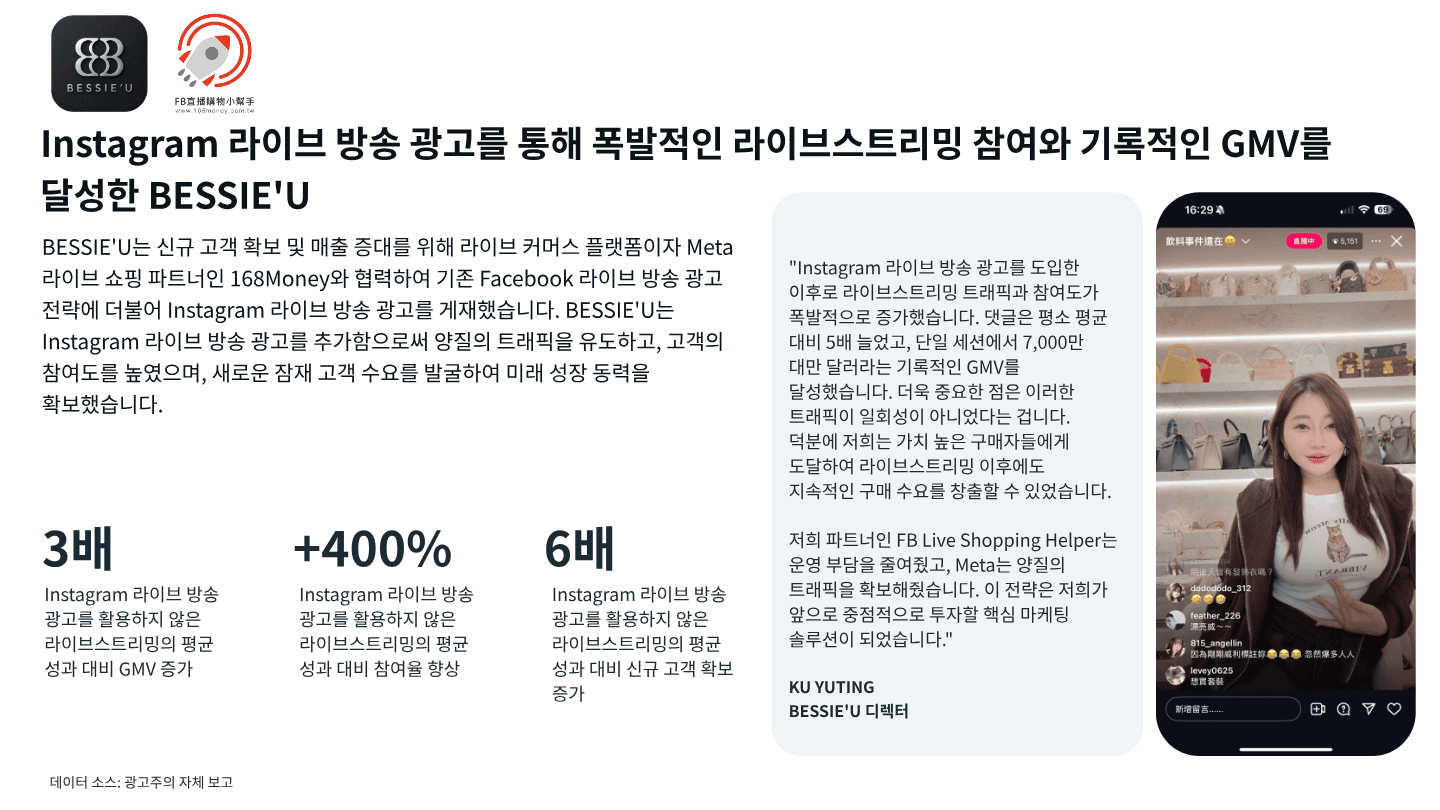
BESSIE'U is a Taiwanese brand that worked with a live commerce platform partner and added Instagram Live ads on top of its existing Facebook live ads. Compared with the average of its streams without the ads, new customer acquisition grew 6x. Comments ran 5x higher than usual, and a single stream hit NT$70 million in GMV. It streamed on a live commerce platform and used Meta ads to bring people in, a setup that closely mirrors what works well for Shoplive customers.
Brand | voilà.id | BESSIE'U |
|---|---|---|
Profile | Indonesian luxury e-commerce | Taiwanese brand |
Viewers | Under 100 → 9,000+ | Not disclosed |
Response | 3.5 million total views | Engagement +400%, comments 5x |
Sales | ROAS 45x, in-stream conversion value 2x | GMV 3x |
New customers | Not disclosed | New customer acquisition 6x |
Source: Meta, "Instagram Live Video Ads" guidebook. voilà.id figures come from Ads Manager data (October 2025 campaign). BESSIE'U figures are self-reported by the advertiser and compared with the average of streams that didn't use Instagram Live ads.
Both are success stories Meta picked, so don't read them as typical results. Meta itself suggests that if you're new to live streaming or these ads, you start with a small test using the exact settings you plan to run.
How Can Shoplive Customers Use Them?
It's a simple split: new customers come in through Instagram ads, while purchases and customer data stay on your own online store.
Many Shoplive customers go live on their own store and use simulcasting to send the same show to Instagram. Add live ads, and the flow looks like this.
Start a live show on your own store with Shoplive, and stream it to Instagram with social simulcasting.
Use Instagram Live ads to show the stream to people who don't follow you.
Point the link on the live screen, or the ad's landing page, to your store's live page or product page.
Purchases happen on your store, and data from first-time customers stays with your brand.
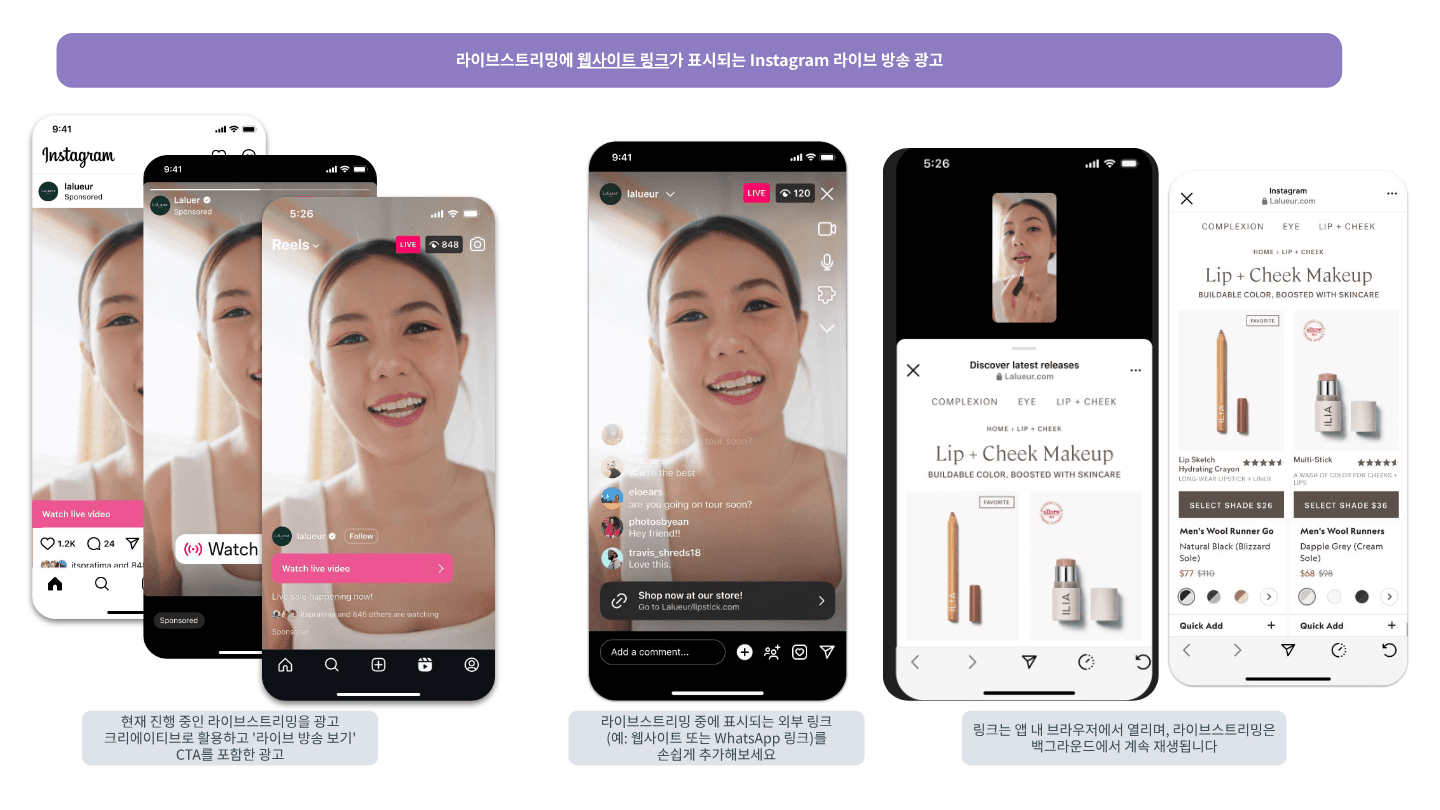
Tap the link on the live screen and the product page opens in Instagram's in-app browser while the live keeps playing in the background. Viewers can browse products without missing the show. (Source: Meta, "Instagram Live Video Ads" guidebook)
There's a reason the step to your own store matters. Viewers who come in through Instagram simulcasting can't see the coupons, quizzes, event pop-ups or featured products in your Shoplive show. To hold on to the new viewers your ads bring in, you need a bridge that moves them over to the show on your store. For a brand that hit the limits of Instagram Live alone and moved to live shows on its own store, read MARN5's story.
Setup | Instagram Live only |
|
|---|---|---|
New viewers | Won through ads | Won through ads |
Coupons, quizzes, pop-ups | Hidden from Instagram viewers | Shown as-is in the show on your store |
Where people buy | Leave via an external link to check out | Right on your store's live screen |
Customer data | Stays with the platform | Saved as first-party data on your store |
Bringing them back next time | Depends on follows | Reach them again via membership, alerts and CRM |
Test Before You Add Ads to a Simulcast
You schedule live ads in Ads Manager by choosing 'Upcoming live video'. How a simulcast stream (RTMP streaming) appears in Ads Manager can vary by account. Before you run your first ad, do a private test stream and check two things.
Does the stream show up as an option in the live video ad settings in Ads Manager?
Once you go live, does the ad's delivery status switch to active?
An Instagram stream key you saved earlier may no longer be valid when you go live. To be safe, check and enter a fresh key right before the show.
What Should You Check Before Setting Up the Ads?
Get a few things right first: account eligibility, your spending limit, stream length and when you schedule. Here are Meta's guidelines, plus what we've learned running live shows at Shoplive.
Item | Recommendation |
|---|---|
Eligible accounts | Professional or creator accounts with 1,000+ followers |
Ad account spending limit | Check it first (new accounts have low limits, and ads stop once you hit yours) |
Stream length | At least 1 hour 30 minutes (Meta recommends 2 hours or more) |
Ad scheduling | At least 3 hours before the stream starts |
Going live | Start 10 to 15 minutes early to warm up the room |
Number of ad sets | Up to 2 per stream |
Delivery type | Standard delivery (accelerated delivery isn't available) |
If you want to track results all the way to purchases on your store, also make sure the Meta Pixel is installed there. You'll connect it as a tracking event in Step 9.
How Do You Set Up Instagram Live Ads?
In Meta Ads Manager, you go through 9 steps in this order: campaign → ad set → ad. Start with the overview table below, then follow the screenshots step by step. Screenshots are as of October 20, 2026, and menu names may shift slightly as Meta updates the tool.
The screenshots show the Korean-language version of Ads Manager. The menus are the same in English, and this guide uses the English labels.
Step | Where | Key settings |
|---|---|---|
STEP 1 | Campaign | Auction buying type, campaign objective, manual campaign |
STEP 2 | Campaign | Turn on live video ads → Instagram |
STEP 3 | Campaign | Ad set budget, catalog ads and A/B test off |
STEP 4 | Ad set | Conversion location, performance goal, conversion event |
STEP 5 | Ad set | Schedule for an upcoming live video (3 hours ahead) |
STEP 6 | Ad set | Lifetime budget, schedule matching the stream time |
STEP 7 | Ad set | Broad audience, Advantage+ placements |
STEP 8 | Ad | Use live video, primary text, landing page |
STEP 9 | Ad | Connect tracking (Pixel), then publish |
STEP 1. Create a New Campaign
📍 Set in: Campaign
✔️ Click 'Create' in Ads Manager
✔️ Buying type: 'Auction'
✔️ Campaign objective: Choose Traffic, Engagement, Leads or Sales
✔️ Campaign setup: Choose 'Manual campaign'

Meta recommends four campaign objectives for live ads. Each has a different purpose and its own set of performance goals.
Campaign objective | Purpose | Available performance goals |
|---|---|---|
Traffic | Send people to your website, app, Instagram profile and more | Maximize number of link clicks |
Engagement | Get more messages, video views and post engagement | Maximize ThruPlay views, number of conversations, number of link clicks or number of conversions (off-site) |
Leads | Collect leads for your business or brand | Maximize number of conversions (off-site) or number of link clicks |
Sales | Find people likely to buy | Maximize number of conversions (off-site) or number of link clicks |
Pick an objective and click 'Continue' to open the campaign setup window. Choose 'Manual campaign' (for example, Manual traffic campaign) and click 'Continue' again. If you choose the recommended setup instead, Advantage+ audience, Advantage+ placements and similar settings are applied by default.
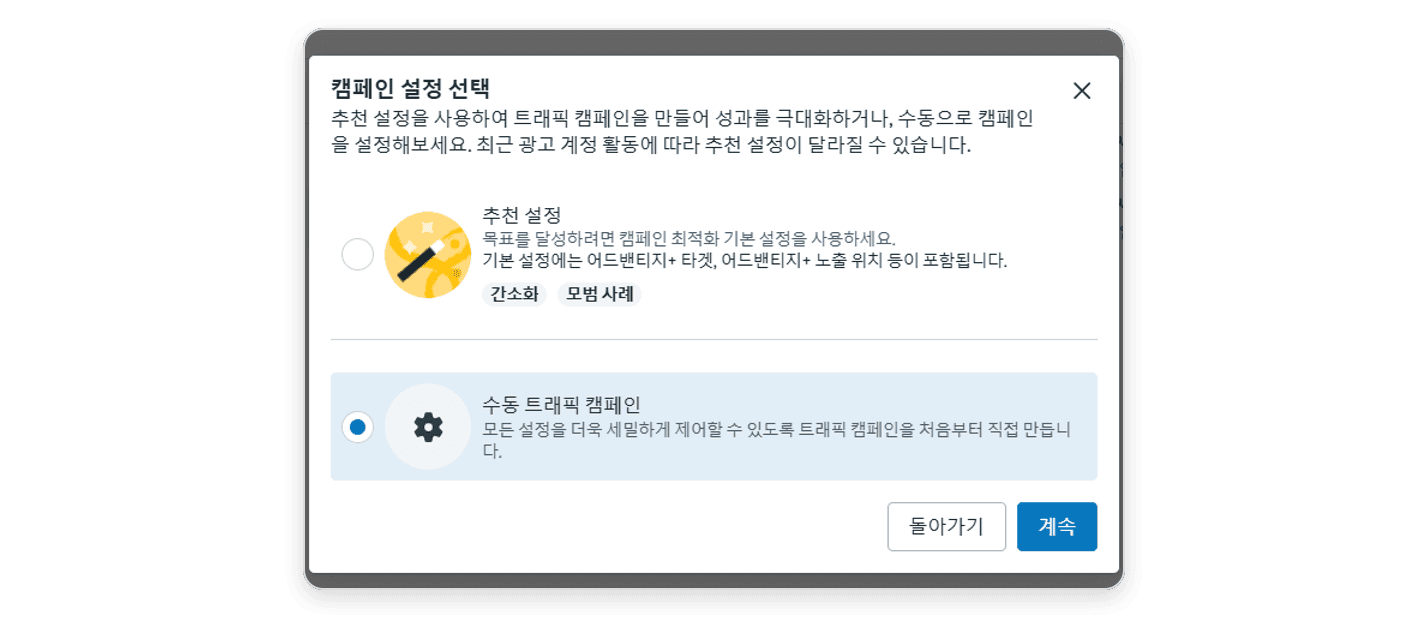
STEP 2. Turn On Live Video Ads
📍 Set in: Campaign
✔️ Campaign name: Include the stream date and product so it's easy to find
✔️ Live video ads: Turn on the toggle → set live video location to 'Instagram'
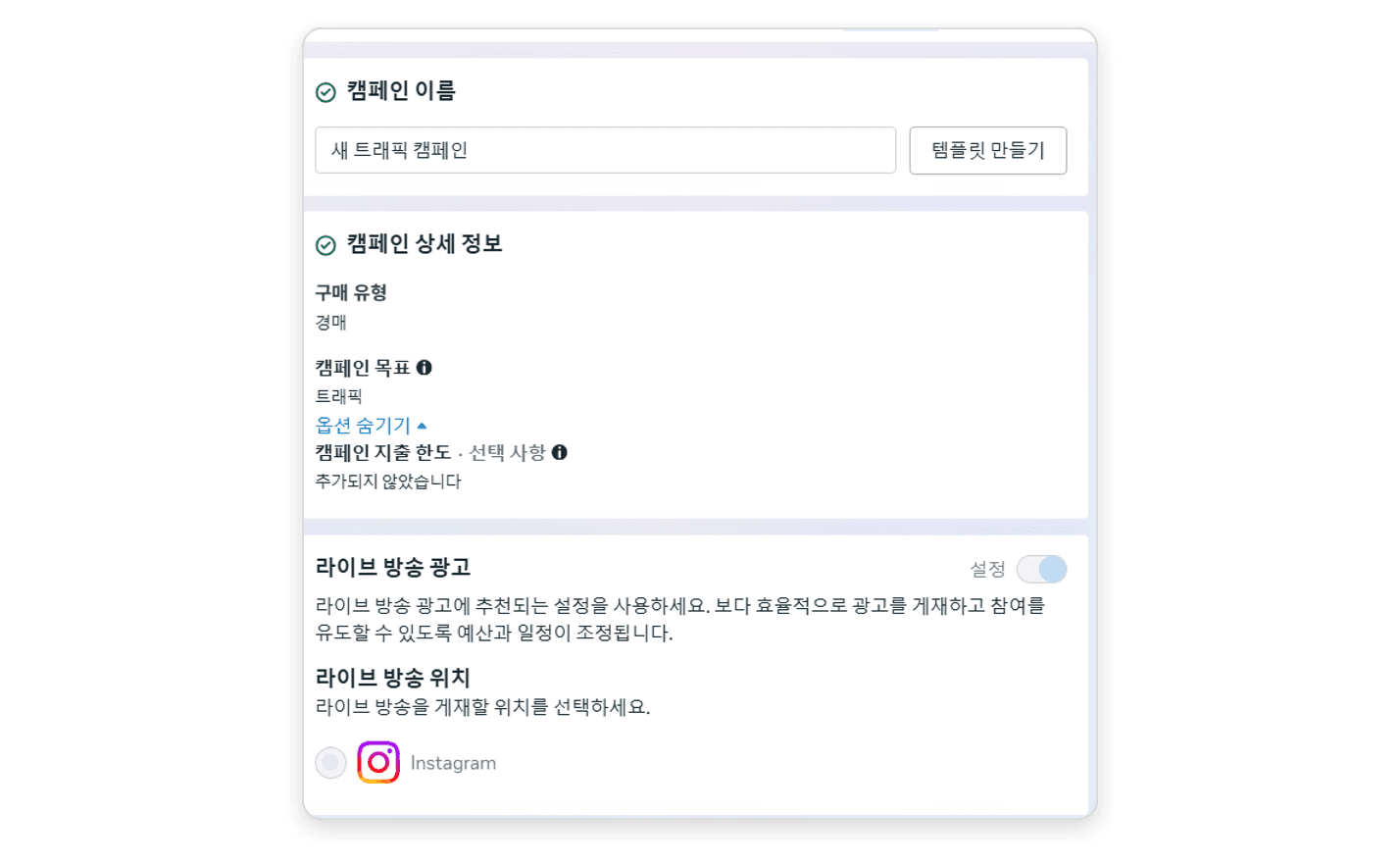
In campaign details, check that the buying type (Auction) and campaign objective you chose in Step 1 are correct. Once live video ads are on, budget and schedule adjust automatically so the ads deliver efficiently.
STEP 3. Pick a Budget Strategy and Turn Off Two Options
📍 Set in: Campaign
✔️ Budget strategy: 'Ad set budget'
✔️ Advantage+ catalog ads: Off
✔️ A/B test: Off
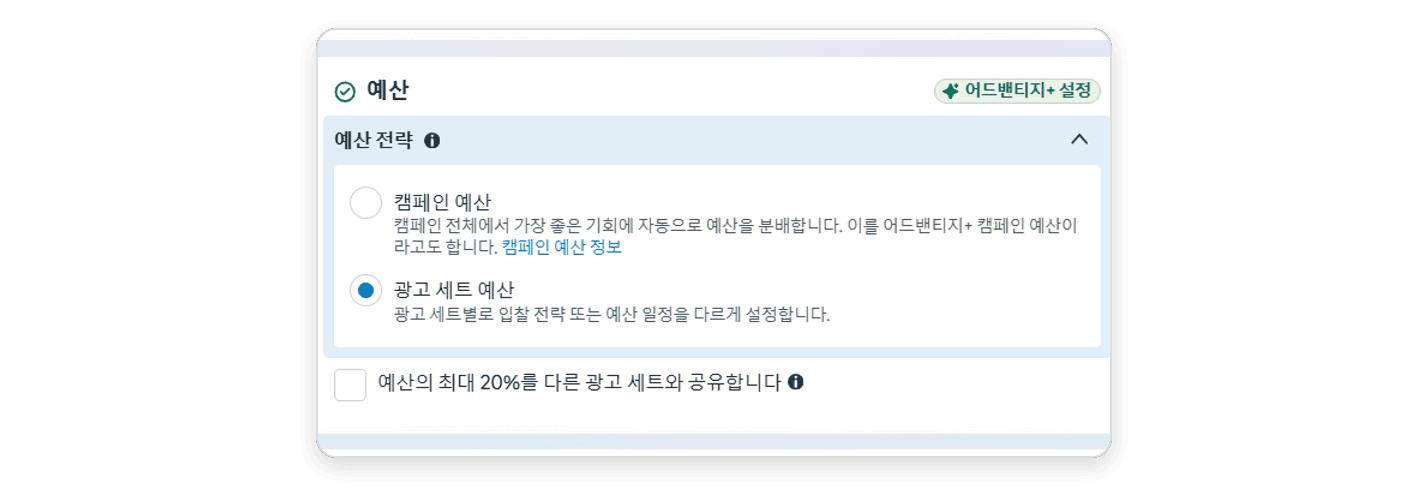
An ad set budget makes delivery more stable.
Option | What it does |
|---|---|
Campaign budget | Automatically moves budget to the best performers across the campaign (Advantage+ campaign budget) |
Ad set budget | Sets the bid strategy and budget schedule separately for each ad set |

STEP 4. Set the Conversion Location and Performance Goal
📍 Set in: Ad set
✔️ Conversion location: 'Instagram live video'
✔️ Live video location: The Instagram profile you'll stream from
✔️ Performance goal: Match your campaign objective ('Maximize number of link clicks' for Traffic)
✔️ Conversion event: 'Purchase'
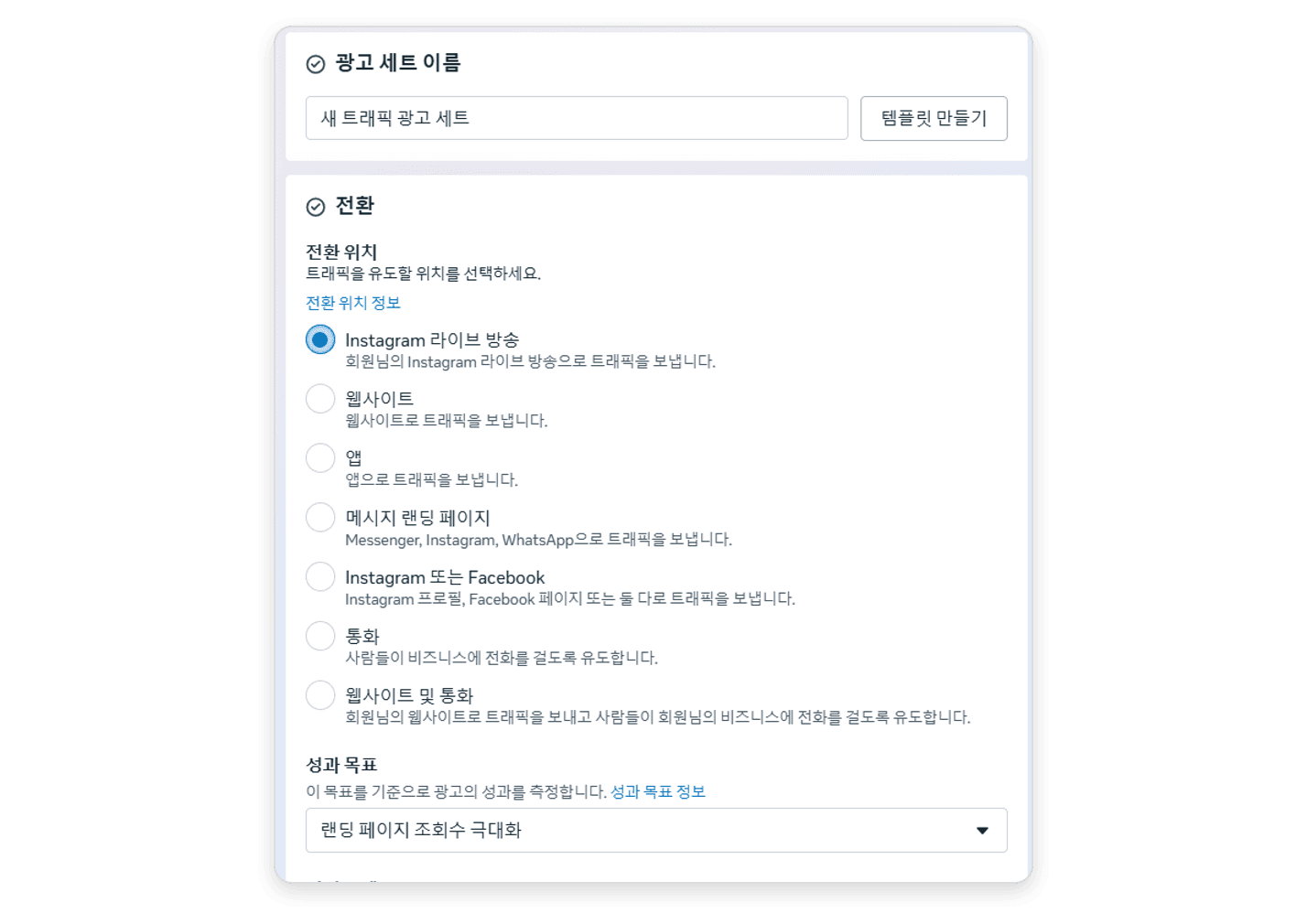
Traffic campaigns default to the 'Maximize number of landing page views' performance goal. For live ads, change it to 'Maximize number of link clicks'.
STEP 5. Schedule the Live Video Ad
📍 Set in: Ad set
✔️ Live video ad setup: 'Upcoming live video'
✔️ When to schedule: At least 3 hours before the stream starts
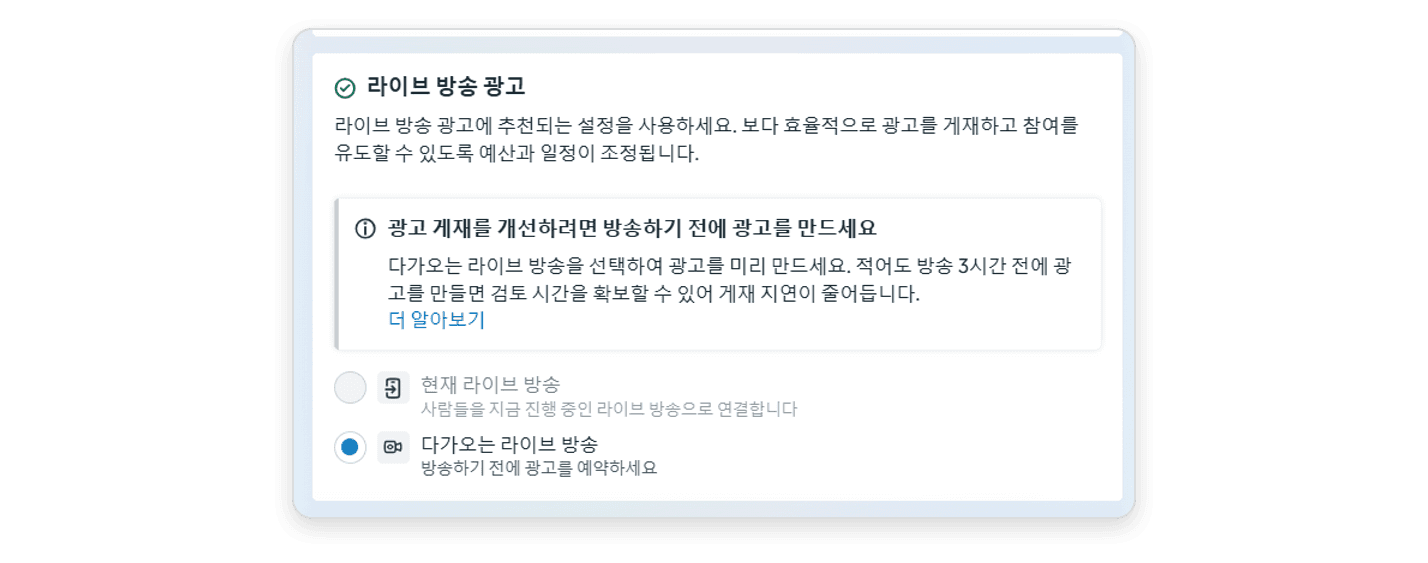
You can attach an ad to a live that's already on air, but scheduling ahead works better.
You won't be scrambling to fix things in Ads Manager mid-show.
Scheduled ads go into review before the show, so they start delivering faster once you go live.
STEP 6. Set the Budget and Schedule
📍 Set in: Ad set
✔️ Budget: 'Lifetime budget'
✔️ Schedule: Enter start and end times that match the actual stream exactly
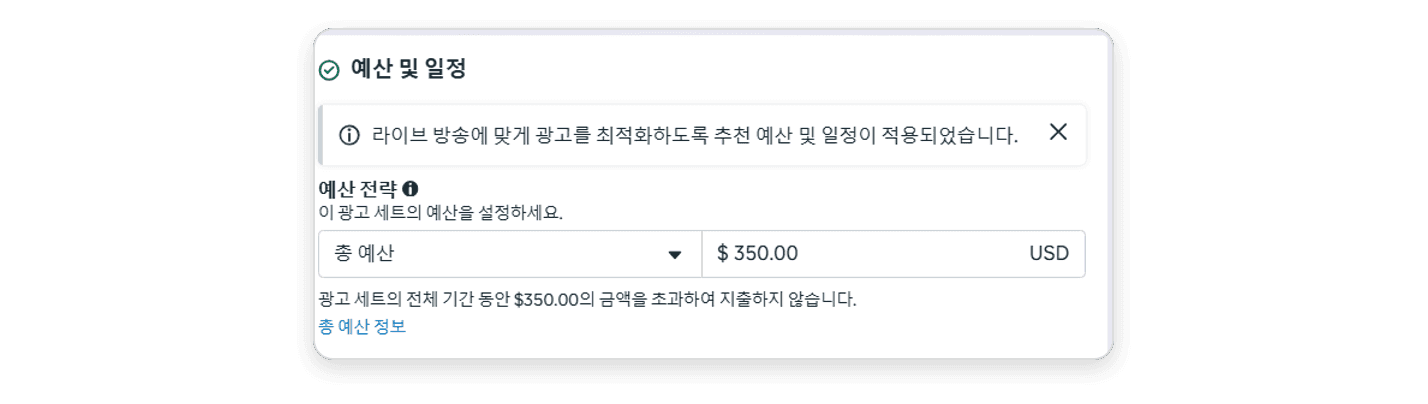
For example, if you go live at 4 p.m. for 4 hours, set the start to 4 p.m. and the end to 8 p.m.

The ads only deliver while you're live. If you go live later than scheduled, delivery takes a hit, so always enter both a start and end time and match them to the actual stream.
STEP 7. Choose Your Audience and Placements
📍 Set in: Ad set
✔️ Audience: Go broad, not narrow (Advantage+ audience)
✔️ Placements: Advantage+ placements

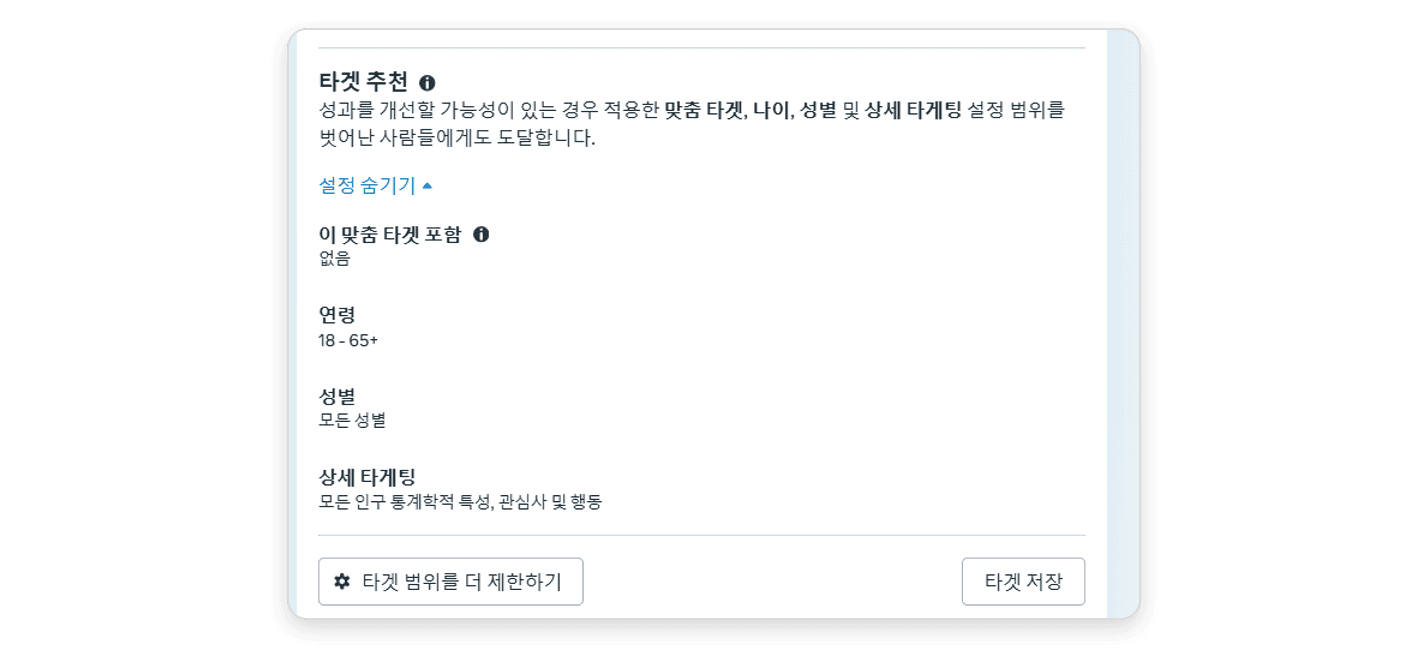
Live campaigns run on a fixed time slot, so they need to reach as many people as possible in a short window. That's why a broad audience beats a narrow one here.
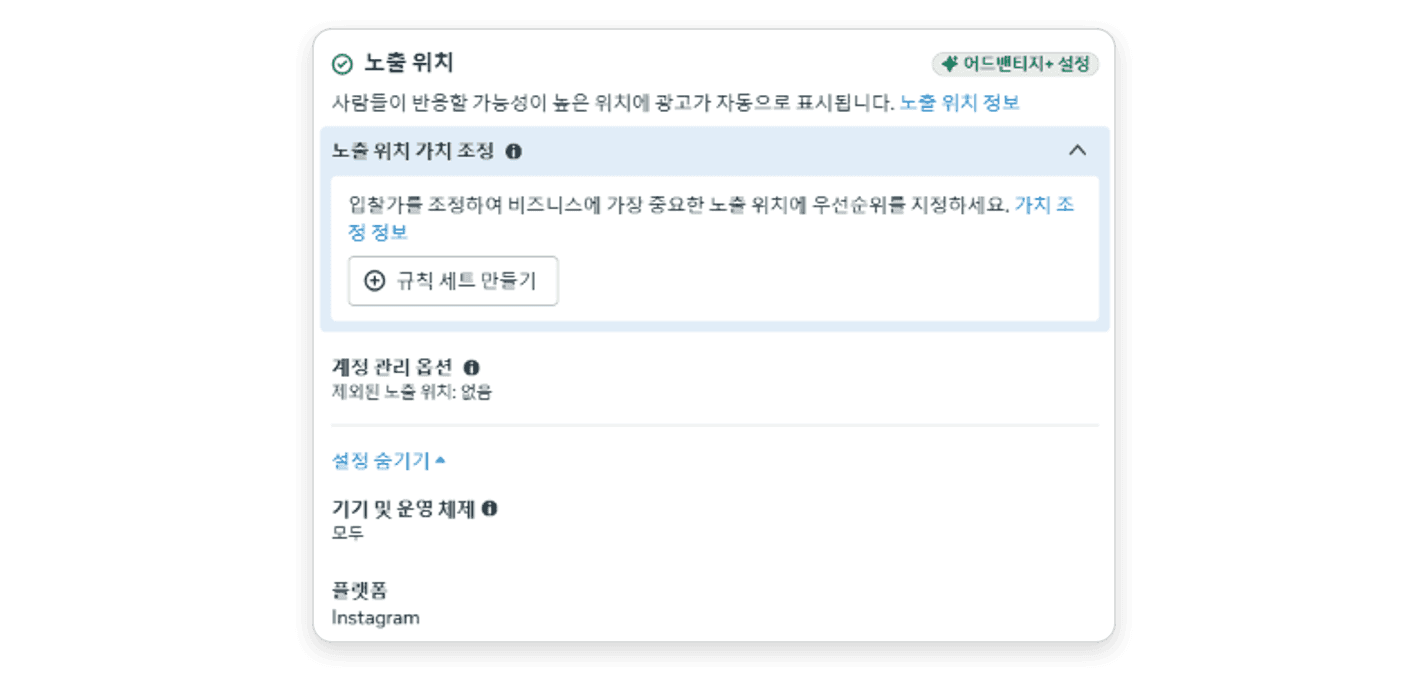
Live ads currently run in Instagram Feed, Reels and Stories. For better budget efficiency, use Advantage+ placements.
STEP 8. Set Up the Ad Creative
📍 Set in: Ad
✔️ Ad setup: 'Use live video' (default)
✔️ Primary text: Up to 125 characters
✔️ Landing page: Choose live video, website or WhatsApp
✔️ Call to action (CTA): 'Watch live video' (default)

Lead your primary text with a perk viewers can only get during the show to drive clicks. To send viewers straight to your own store, set the landing page to 'Website'.
STEP 9. Set Up Tracking and Publish
📍 Set in: Ad
✔️ Tracking: Connect website events (Meta Pixel)
✔️ Publish: Click 'Publish' and keep the campaign active

If you're sending people to your own store, connect website events so you can see results through to purchase. The ads start delivering at the scheduled stream start time.
What Setup Mistakes Do Brands Make Most?
Most come from leaving defaults as they are, or from an ad schedule that doesn't match the stream.
Common mistake | Do this instead |
|---|---|
Leaving the performance goal on its default | For Traffic campaigns, switch to 'Maximize number of link clicks' |
Leaving A/B test or catalog ads on | Turn both off for live ads |
Creating the ad right before the show | Schedule it at least 3 hours ahead with 'Upcoming live video' |
Going live later than scheduled | Go live 10 to 15 minutes early |
Creating lots of ad sets | Up to 2 per stream |
Targeting too narrowly | Go broad with Advantage+ audience (up to 14.8% lower cost per result) |
Picking placements manually | Use Advantage+ placements (5% lower CPA on average) |
Choosing accelerated delivery | Keep the default standard delivery (accelerated delivery isn't available) |
Figures from Meta, "Instagram Live Video Ads" guidebook. Meta notes that these tips don't guarantee delivery frequency or results.
What Should You Check on Show Day?
✔️ Before scheduling the ad: Is your ad account spending limit comfortably above this show's budget?
✔️ 3 hours before: Have you confirmed in Ads Manager that the ad is approved?
✔️ 10 to 15 minutes before: Have you gone live early to warm up the room?
✔️ Have you added a link to your store's live page or product page on the live screen?
✔️ Is the host telling Instagram viewers about the coupons and link out loud?
✔️ Will you stay live until the ad's end time?
✔️ After the show, have you checked reach, impressions and views alongside purchases on your store?
Frequently Asked Questions
Q. Can anyone use Instagram Live ads?
Professional or creator accounts with 1,000 or more followers can use them. You can create them in Ads Manager, Meta Business Suite or the Instagram app.
Q. How much do Instagram Live ads cost?
They're priced the same as regular Meta ads, with no extra fee on sales or transactions during the live. In Meta's research, businesses that spent $100 or more had about 24 times as many live viewers as businesses that didn't use the ads.
Q. When should I create the ad?
Schedule it with 'Upcoming live video' at least 3 hours before the stream starts. That leaves time for review, so the ad starts delivering faster once you go live.
Q. Can I create an ad while I'm already live?
Yes. Choose 'Current live video' in the ad set to attach an ad to the stream on air. Approval takes time, though, so you could miss the start of the show. Scheduling ahead is the safer choice.
Q. Can I send ad viewers to my own online store?
Yes. You can add a website link to the live screen, or set the ad's landing page to 'Website'. Shoplive customers can link to the live page on their own store and keep the purchases and customer data there.
Q. Where can I see how my ads performed?
Ads Manager shows reach, impressions and video view metrics. To track purchases on your store, connect Meta Pixel website events in Step 9.
📝 Related Reading
Shoplive Launches TargetAds, Korea's First Live Commerce Ad Product
Bring Viewers Back to Your Live Shows with 'Attendance Tracking' Events
References
Meta, "Instagram Live Video Ads" guidebook and Meta Ads Manager screens (as of October 20, 2026)
Digital Today, "Meta to launch Instagram Live ads in South Korea" (Sept. 30, 2026)
Want to plan Instagram ads and live shows on your own store together? See Shoplive simulcasting in a demo.


