How to Make the Most of Live Pop-Ups
Words by
Shoplive
💡 The short version
A pop-up is a small window over the broadcast. Viewers can check something, join in, or buy without leaving the stream.
Ten types, from notices and coupons to quizzes and offers. Early ones hold attention, mid-show ones invite participation, late ones close the sale.
Install the player once and you switch them on in the admin, with no development. Viewers respond at different moments, so spread them across the whole show.
Two broadcasts can cover the same product and land very differently: viewers slip away from one and stay to the end of the other. Pop-ups designed into the stream are what hold attention and carry it through to a purchase. Here is what each pop-up does, when to use it, and how to turn it on.
Why pop-ups go unused, even when they work
A broadcast that only describes a product loses viewers fast. What keeps people watching, draws them in, and eventually leads to a purchase is the small interactions inside the stream. Notices, coupons, quizzes: each one gives a viewer a reason to stay.
For the marketer or operator running the show, though, every pop-up looks like a development ticket. A team without a dedicated live developer finds that preparing new interactions for each broadcast is a burden in itself, so they stick to the basics, or put live off entirely.
What is a live pop-up?
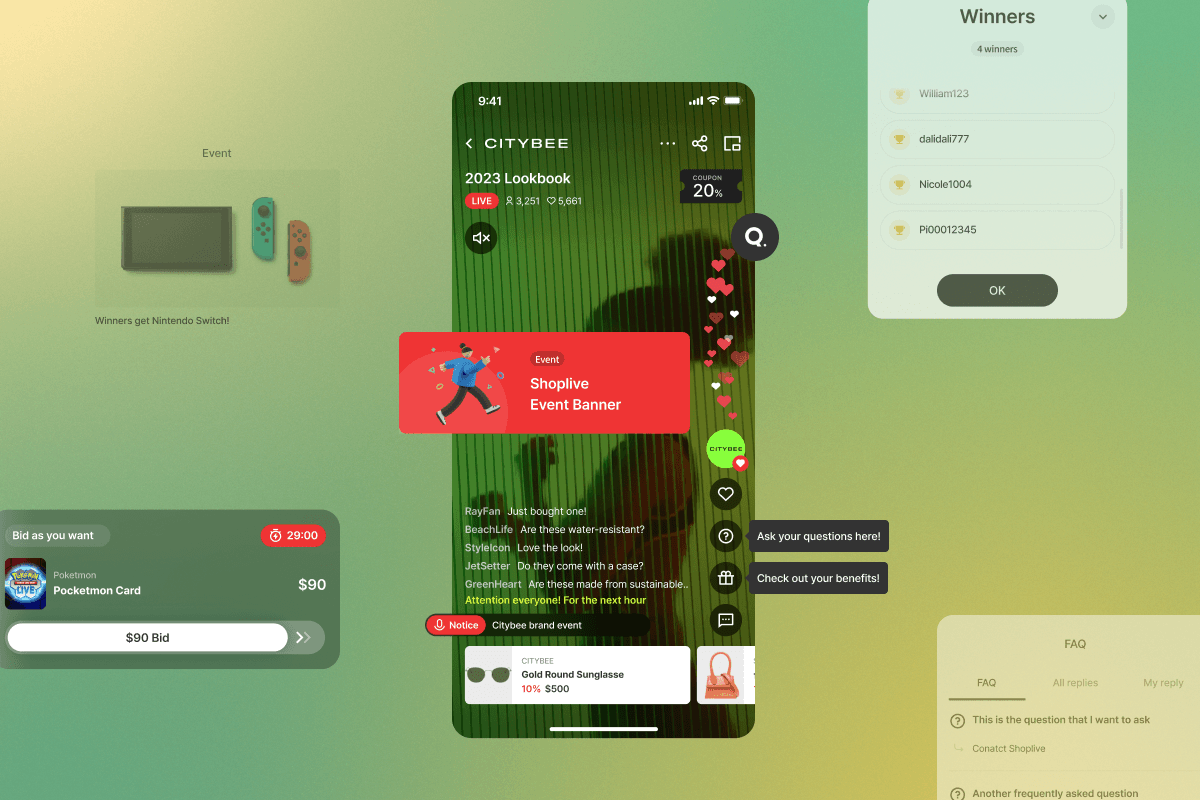
A live pop-up is a small interaction window layered over the live broadcast. Types differ by purpose, notices, coupons, quizzes, and each one lets a viewer check something, take part, or move toward a purchase without leaving the stream.
What each type does, and when it belongs in the show.
Pop-up | What it does | When to use | Worth knowing |
|---|---|---|---|
Notice | Keeps viewers informed of key information or changes | Early | Attach a click event and it leads to an action such as a coupon download |
Banner | Shows a message at a chosen moment and links to a page on click | Throughout | A full-size banner can hold a transparent image and act as an on-screen frame |
Coupon | Offers a discount that can be used during the broadcast | Early / late | One coupon at a time. Choose instant download or a dwell-time coupon that unlocks after a minimum watch time |
Offer | Lists several offers as images with descriptions | Late | Use this instead of the coupon pop-up when there are multiple coupons |
Quiz | Viewers tap to answer, then winners are announced | Mid-show | Reward everyone correct, or draw a random subset |
Survey | A light one-tap choice with no right answer | Mid-show | Live response ratios are shown alongside |
Prize draw | Runs a draw with entry conditions | Early / mid | Cumulative watch time can be an entry condition |
FAQ | Publishes prepared questions and answers | Late | Answers to live questions are archived and displayed too |
Purchase verification | A draw that requires an order number to enter | Late | Turns prize-hunters into buyers during the show |
Auction | Real-time bidding to buy at the viewer's price | Throughout | The bidding itself is what holds attention |
Each type has a fixed job. A coupon pop-up shows one coupon at a time, so when you have several, a broadcast-only coupon, a sign-up coupon, a card discount, group them in an offer pop-up instead. A full-size banner accepts a transparent image and can work as an on-screen frame, which is how teams tidy up the screen without a separate broadcast tool.
The pop-ups Shoplive gives you
Shoplive live pop-ups ship inside the live player: notices, banners, coupons, quizzes, surveys, offers, FAQs, prize draws, purchase verification, and auctions. You switch them on and off in the admin to match the broadcast, with nothing to build or design per show.
Notice Pop-ups
The notice pop-up keeps viewers continuously informed of important information or changes during a live broadcast. It helps viewers avoid missing the key points of the show and delivers product-related updates in real time. Viewers can click the pop-up to go to a related detail page or view the content along with additional images.
FAQ Pop-ups
The FAQ pop-up provides prepared answers to anticipated questions and archives and displays responses to questions that come in during the live show. It resolves viewers' common questions and strengthens communication, helping to build trust.
Promotion Banners and Benefit Pop-ups
Promotion banners and benefit pop-ups share special events and offers in real time to attract attention and drive purchases. A banner presents a product description or announcement as a pop-up at a specific moment during the broadcast and links to a designated website when clicked. With the benefit pop-up, viewers can click a button to view offer details as a list of images and text.
Quiz, Survey, and Event Pop-ups
Quiz, survey, and event pop-ups encourage active viewer participation and add an element of fun to the broadcast. Quizzes tell viewers whether their answers are right or wrong, while surveys let them see other viewers' opinions instantly. Operators can gather viewer preferences and opinions as data, and event pop-ups boost participation to raise interest in the product.
Coupon Pop-ups
The coupon pop-up offers discount coupons that can be used immediately during the broadcast to encourage purchases. Clicking a coupon takes viewers to a page with additional offers, or directs viewers who aren't logged in to a login or sign-up page, helping to acquire new users.
Auction Pop-ups
The auction pop-up lets viewers bid in real time to buy a product at the price they want. The live price competition heightens immersion in the event, and the strong sense of achievement and satisfaction that come from a winning bid and purchase deliver a buying experience unlike anything in conventional live commerce.
Purchase Verification Pop-ups
Purchase verification runs as a prize draw that requires an order number to enter. Viewers chasing the prize buy during the broadcast rather than after it.
Which pop-up belongs at which moment?
Pop-ups pay off when they follow the viewer's journey through the show.
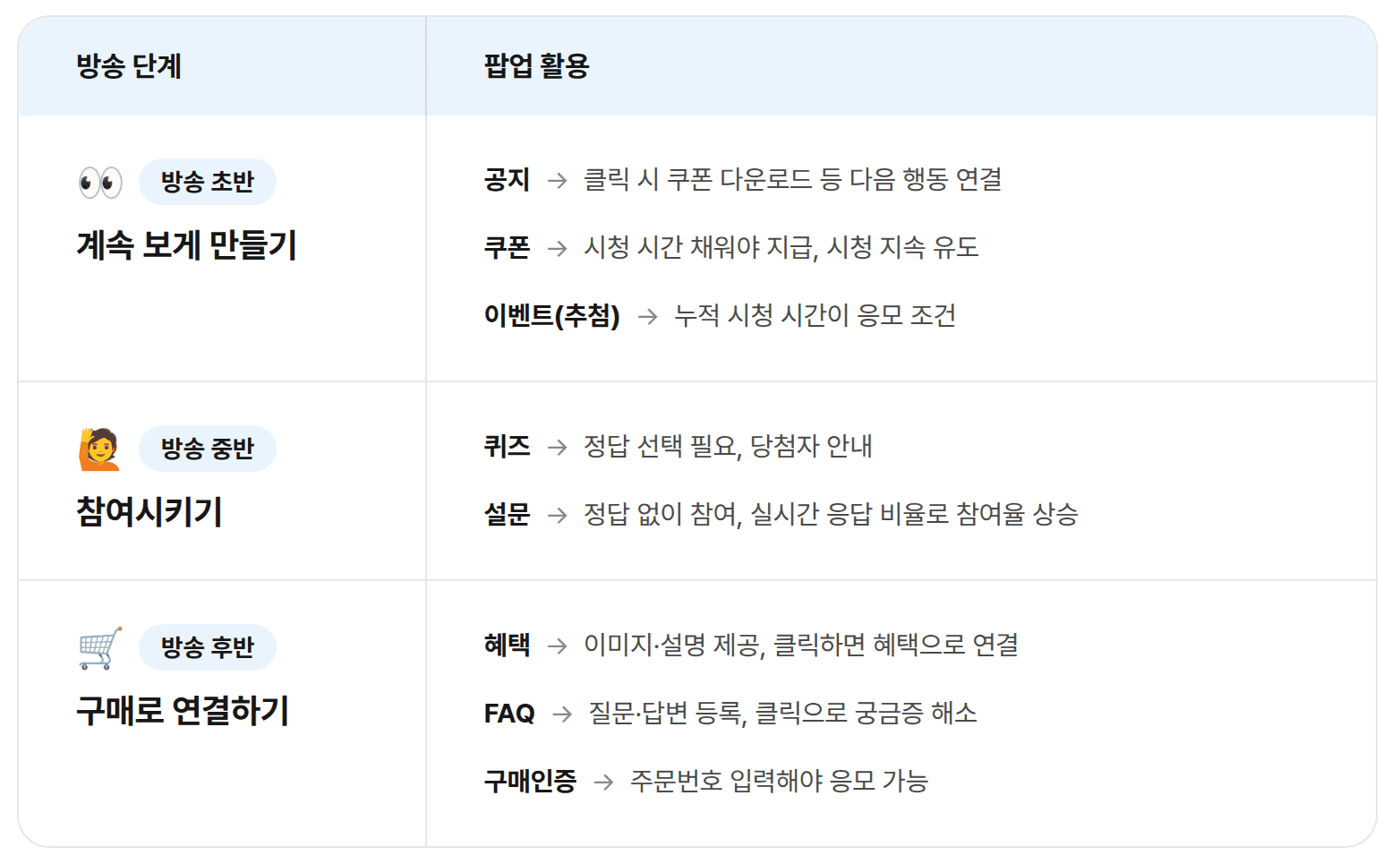
Early in the broadcast, notices and coupons and prize draws keep viewers watching. A notice is a free-form text banner; attach a click event and it goes beyond an announcement to something like a coupon download. A coupon can be issued instantly, but set it to unlock after a minimum watch time and it becomes a reason to keep watching. A prize draw can count cumulative watch time as an entry condition, so only viewers who stay past a threshold qualify.
Mid-show, quizzes and surveys bring viewers in. A quiz has them tap the screen to answer, then announces winners: everyone who got it right, or a random subset. Viewers join for the prize and end up paying closer attention. A survey has no right answer, so anyone can take part, and showing live response ratios makes it visible that others are answering right now, which pushes participation higher.
Late in the show, offers, FAQs, and purchase verification turn attention into a purchase. An offer presents free shipping or a discount as an image with a description, and tapping the one that interests them takes the viewer straight to it. An FAQ answers the question that was holding someone back, on the spot, so a postponed purchase happens now. Purchase verification is a draw that needs an order number, which turns prize-hunters into buyers during the stream.
Install once, and the pop-ups are already there
Shoplive pop-ups work as soon as the live player is installed. On the web that is a single line of script, and major commerce platforms including Cafe24, Godomall, Wisa, MakeShop, and Shopify have a turnkey integration.
Once the player is in, the pop-ups are available automatically. Notices, coupons, quizzes and the rest already live in the player, so any broadcast can switch them on. Nothing has to be rebuilt per show, and no ticket goes to the development team.
The screens for building each pop-up, and every setting they carry, are documented in the Live Admin guide to creating pop-ups: coupon delivery types, time limits, click events, and image specifications, screen by screen.
More moments that land, more revenue
Viewers respond at different points. Someone who tuned out during the opening explanation reacts to the quiz in the middle; someone who ignored the quiz decides at the offer pop-up near the end. Spread pop-ups evenly across the broadcast and the number of viewers who respond somewhere goes up, and so do purchases.
Going further
Once the basics are running, the same pop-ups can be pushed harder: a coupon pop-up used as a navigation button, a full-size banner used as an on-screen frame or a product card. We covered those with examples in advanced live pop-up tactics. If you are still deciding whether live fits your store, start with the complete guide to live commerce.
Frequently Asked Questions
Q. What pop-ups does Shoplive offer?
Notices, banners, coupons, quizzes, surveys, offers, FAQs, prize draws, purchase verification, and auctions. You pick the types that fit the broadcast and combine them.
Q. When in a broadcast should each pop-up run?
Use notices, coupons, and prize draws to keep viewers watching; quizzes and surveys to draw participation; offers, FAQs, and purchase verification to convert. Viewers respond at different points, so spreading them across the whole show works best.
Q. Do we have to build pop-ups for every broadcast?
No. Pop-ups are built into the live player, so there is nothing to develop or design per show. You choose the type in the admin and switch it on.
Q. How much development does it take to start?
Only the initial install of the live player on your site or app. The web takes one line of script, and platforms such as Cafe24, Godomall, Wisa, MakeShop, and Shopify have a turnkey integration. After that, pop-ups and everything else run without further development.
Q. How long does setup usually take?
It depends on your account and integration, so check the exact timeline with your CSM. Creating and switching on the pop-ups themselves happens directly in the admin.
Q. Can pop-ups help acquire new members?
Yes. When a viewer who isn't logged in clicks a coupon pop-up, they can be sent to a login or sign-up page, which contributes to new user acquisition.
Q. Are real-time auctions possible too?
Yes. With the auction pop-up, viewers join real-time bidding and buy at the price they want, which raises immersion in the broadcast.
Q. Can we offer several coupons at once?
A coupon pop-up shows one coupon at a time. To present a broadcast-only coupon, a sign-up coupon and a card discount together, group the coupon images in an offer pop-up so viewers can download each one.
Q. Can we dress up the screen without a tool like OBS?
Yes. Load a transparent image into a full-size banner pop-up and lay it over the live screen to tidy the frame without a separate broadcast tool. It helps most on mobile broadcasts where unwanted areas show.
Wondering which pop-ups would fit the broadcasts you already run? Request a demo and we will walk through it with you.


